

1 简介
研究机器人路径规划优化问题,机器人工作环境复杂,运动路径上存在许多障碍物.针对提高机器人安全导航性能问题,传统群智能算法存在早熟,搜索效率低等难题,难以获得全局最优路径.为了获得最优机器人运动路径,避免碰撞的发生,提出了一种人工蜂群算法的机器人路径规划方法.第一采用栅格法对机器人工作环境进行建模,然后机器人路径规划目标点作为蜜源,最后蜂群之间信息交换,协作搜索最优机器人运动路径.结果表明,人工蜂群算法解决了传统群智能算法存在的难题;加快了机器人路径规划求解速度,以较短时间找到最短机器人运动路径.
2 部分代码
%
function varargout = robotpath(varargin)
gui_Singleton = 1;
gui_State = struct( gui_Name , mfilename, …
gui_Singleton , gui_Singleton, …
gui_OpeningFcn , @robotpath_OpeningFcn, …
gui_OutputFcn , @robotpath_OutputFcn, …
gui_LayoutFcn , [] , …
gui_Callback , []);
if nargin && ischar(varargin{1})
gui_State.gui_Callback = str2func(varargin{1});
end
if nargout
[varargout{1:nargout}] = gui_mainfcn(gui_State, varargin{:});
else
gui_mainfcn(gui_State, varargin{:});
end
% End initialization code – DO NOT EDIT
% — Executes just before fpp is made visible.
function robotpath_OpeningFcn(hObject, eventdata, handles, varargin)
handles.output = hObject;
% Update handles structure
guidata(hObject, handles);
% — Outputs from this function are returned to the command line.
function varargout = robotpath_OutputFcn(hObject, eventdata, handles)
% varargout cell array for returning output args (see VARARGOUT);
% hObject handle to figure
% eventdata reserved – to be defined in a future version of MATLAB
% handles structure with handles and user data (see GUIDATA)
% Get default command line output from handles structure
varargout{1} = handles.output;
%% Initialize map
function pushbutton1_Callback(hObject, eventdata, handles)
cla reset
% current_pos is a robot path including starting point, in which
% current_pos(:,1) represents the start position
current_pos= [-1;-1];
setappdata(0, current_pos ,current_pos);
% target is a robot goal position
target = [-1 ;-1];
setappdata(0, target ,target);
% map is a collection of obstacle in 2d
% each row of the map defines an obstacle
% first column is a x position of obstacle
% second column is a y position of obstacle
% third column defines the length of the obstacle in x axis
% fourth column defines the length of the obstacle in y axis
map=[];
setappdata(0, map ,map);
axes(handles.axes2) % Select the proper axes
axis([-5,100,-5,100])
set(handles.axes2, XMinorTick , on )
%% Insert obstacles
function pushbutton2_Callback(hObject, eventdata, handles)
%% Initialize Axes
axes(handles.axes2) % Select the proper axes
set(handles.axes2, XMinorTick , on )
axis([1 100 1 100]);
%%
hold on
h=msgbox( Draw a wall by using the left mouse button for start and right mouse button for ending the wall );
uiwait(h,5);
if ishandle(h)==1
delete(h);
end
but=0;
%but=1 left but=3 right
while((but~=1)&&(but~=3))
[xs,ys,but]=ginput(1);
end
%%
xs=round(xs);
ys=round(ys);
if(xs <10)
xs = xs-10;
end
if(ys < 10)
ys = ys -10;
end
width = 10;
height = 45;
map = getappdata(0, map );
axes(handles.axes2) % Select the proper axes
%% Draw obstacle
if(but == 1)
rectangle( Position ,[xs,ys,width,height], FaceColor ,[0 0 0])
[m,n] = size(map);
map(m+1,:) = [xs ys width height];
setappdata(0, map ,map);
else
rectangle( Position ,[xs,ys,height,width], FaceColor ,[0 0 0])
[m,n] = size(map);
map(m+1,:) = [xs ys height width];
setappdata(0, map ,map);
end
set(handles.axes2, XMinorTick , on )
map = getappdata(0, map );
% Draw target
function pushbutton3_Callback(hObject, eventdata, handles)
but=0;
while(but~=1)
[xval,yval,but]=ginput(1);
end
pos=[xval,yval];
setappdata(0, target ,pos);
axes(handles.axes2)
hold on
post = [xval yval 4 4];
rectangle( Position ,post, FaceColor , r , Curvature ,[1 1])
hold off
%% Start robot path finding procedure
function pushbutton4_Callback(hObject, eventdata, handles)
map = getappdata(0, map );
target = getappdata(0, target );
current_pos = getappdata(0, current_pos );
if(target == [-1 -1])
msgbox( Please select the target position first );
elseif(current_pos(:,1) == [-1 ;-1])
msgbox( Please select the start position first );
else
%% Find Coolision free path using Artificial Bee Colony Algorithm
Vxy = Create_Food_Points(map, target, 500,5,95 );
hold on
plot(Vxy(:,1),Vxy(:,2), go )
pause(1)
refresh
abc_plot_handle = [];
for i = 1:50
[m n] = size(current_pos);
[cost pos] = artificial_bee_colony(map, Vxy);
current_pos(:,n+1) = pos.Position ;
setappdata(0, current_pos ,current_pos);
hold on
abc_plot_handle(i) = plot(current_pos(1,:),current_pos(2,:), –rs , LineWidth ,2,…
MarkerEdgeColor , k ,…
MarkerFaceColor , g ,…
MarkerSize ,10)
pause(2)
if ((cost < 5))
[M N] =size(map)
collide = 0;
for i=1:M
collide = is_collide( map(i,:), current_pos(:,n+1), target );
if collide == 1
break;
end
end
if(collide == 0)
break;
end
end
end
[m n] = size(current_pos);
post = [current_pos(n) current_pos(n) 4 4];
hold on
plot(current_pos(1,:),current_pos(2,:), * )
%% Optimize path usin EP algorithm
for i = 1:20
current_pos = ep_algorithm( map, current_pos );
end
delete(abc_plot_handle);
plot(current_pos(1,:),current_pos(2,:), –rs , LineWidth ,2,…
MarkerEdgeColor , k ,…
MarkerFaceColor , g ,…
MarkerSize ,10)
pause(2)
end
% — Executes on button press in pushbutton5.
function pushbutton5_Callback(hObject, eventdata, handles)
%% Draw starting point
function pushbutton9_Callback(hObject, eventdata, handles)
but=0;
while(but~=1)
[xval,yval,but]=ginput(1);
end
current_pos=[xval;yval];
setappdata(0, current_pos ,current_pos);
axes(handles.axes2)
hold on
post = [xval yval 4 4];
rectangle( Position ,post, FaceColor ,[0 0.5 0.3], Curvature ,[1 1])
hold off
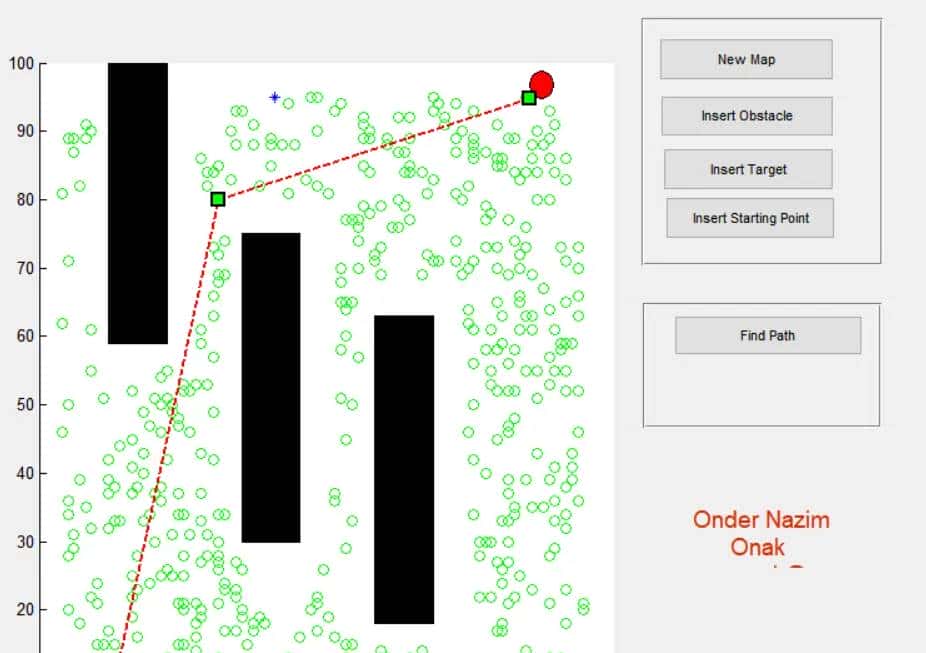
3 仿真结果
4 参考文献
[1]黎竹娟. “人工蜂群算法在移动机器人路径规划中的应用.” 计算机仿真 29.12(2012):4.
博主简介:擅长智能优化算法、神经网络预测、信号处理、元胞自动机、图像处理、路径规划、无人机等多种领域的Matlab仿真,相关matlab代码问题可私信交流。
部分理论引用网络文献,若有侵权联系博主删除。完整代码获取关注微信公众号天天matlab














暂无评论内容