

在Android开发中,通过扩展Binder类实现绑定服务是一种常见的本地服务绑定方式,适用于服务和客户端位于同一应用和进程中的场景。确保在合适的生命周期方法中绑定和解绑服务,避免内存泄漏。通过这种方式,你可以方便地在本地应用中实现服务的绑定和调用,而无需复杂的IPC机制。
一、实现步骤
1、创建服务类:
创建一个服务类,继承自 Service。在服务类中,创建一个内部类继承自 Binder,并在该内部类中提供一个方法来返回服务类的实例。在服务类的 onBind() 方法中返回Binder实例。若需要进行数据回调,则定义一个回调接口类,包含需要回调的方法。在服务类中,添加一个回调接口类的引用,并提供设置回调接口的方法。
2、创建客户端:
在客户端(如Activity)中,创建一个 ServiceConnection 对象,用于处理与服务的连接。在 ServiceConnection 的 onServiceConnected() 方法中,将返回的 IBinder 对象转换为自定义的 Binder 类实例,并通过该实例获取服务类的实例。通过服务类的实例,设置回调接口类的实例,在回调接口的方法中处理回调的数据。使用服务类的实例调用服务中的公开方法。
3、绑定和解绑服务:
在客户端的合适生命周期方法中(如 onStart() ),调用 bindService() 方法绑定服务。在客户端的合适生命周期方法中(如 onStop() ),调用 unbindService() 方法解绑服务。
二、示例
(1)定义服务类(BinderService.kt)
定义扩展 Binder 类 LocalBinder,在 LocalBinder 中定义 getService() 方法用户获取服务类的实例。定义 OnServiceCallback 接口类,用于客户端设置回调函数。定义 DataRepository 类实例,用户获取网络数据。定义 serviceScope 协程,用于实现网络数据的异步执行,防止阻塞异常,当网络数据回调结果后,可通过设置的回调函数,返回到客户端。定义 randomNumber 公开变量,客户端通过服务类实例可直接调用。定义 setCallback() 和 login() 两个公开方法,客户端通过服务类实例可直接调用。
package com.android.component.service.binder

import android.app.Service
import android.content.Intent
import android.os.Binder
import android.os.IBinder
import com.android.component.service.network.DataRepository
import com.android.component.service.network.RemoteDataSource
import com.android.component.service.network.RetrofitClient
import com.android.component.service.network.UserInfo
import kotlinx.coroutines.CoroutineScope
import kotlinx.coroutines.Dispatchers
import kotlinx.coroutines.SupervisorJob
import kotlinx.coroutines.launch
import java.util.Random

/**
 * 采用扩展 Binder 类的方式实现绑定服务
 * 用于客户端和服务器处于同一应用和进程的场景,不支持进程间通信(IPC)
 */
class BinderService: Service() {

    interface OnServiceCallback {
        fun onLoginResult(userInfo: UserInfo?)
    }

    // Binder given to clients.
    private val binder = LocalBinder()
    private var callback: OnServiceCallback? = null
    private var dataRepository: DataRepository? = null

    // 协程
    private val job = SupervisorJob()
    private val serviceScope = CoroutineScope(Dispatchers.IO + job)

    /** 扩展 Binder 类 */
    inner class LocalBinder: Binder() {
        // 返回 LocalBinder 实例,客户端通过该实例可调用本服务的公共方法
        fun getService(): BinderService = this@BinderService
    }

    override fun onCreate() {
        super.onCreate()
        val dataSource = RemoteDataSource(RetrofitClient.apiService)
        dataRepository = DataRepository(dataSource)
    }

    override fun onBind(intent: Intent?): IBinder {
        return binder
    }

    override fun onDestroy() {
        super.onDestroy()
        callback = null
        dataRepository = null
        job.cancel()
    }

    // Random number generator.
    private val mGenerator = Random()

    /** Method for clients.  */
    val randomNumber: Int
        get() = mGenerator.nextInt(100)

    /**
     * 设置回调函数
     */
    fun setCallback(callback: OnServiceCallback) {
        this.callback = callback
    }

    /**
     * 用户登录
     */
    fun login(userName: String, password: String) {
        serviceScope.launch {
            val userInfo = dataRepository?.login(userName, password)
            callback?.onLoginResult(userInfo)
        }
    }
}
(2)定义客户端类(BinderClient.kt)
定义 connection 变量,用于绑定服务时的处理与服务的连接,在其中的 onServiceConnected() 方法中,获取到服务类的实例 binderService ,并同时设置服务的回调函数 serviceCallback。定义绑定服务方法 bindService() 和解绑服务方法 unbindService() 。定义服务类中公开方法在客户端中所对应的方法 getRandomNumber()、login(),通过服务类的实例直接调用来实现。定义 Activity 中需要的客户端监听器接口类 OnClientListener,并同时定义相应的设置方法 setListener(),这样从服务类返回的数据可以回调到界面上进行显示。
package com.android.component.service.binder

import android.content.ComponentName
import android.content.Context
import android.content.Intent
import android.content.ServiceConnection
import android.os.IBinder
import android.os.RemoteException
import android.util.Log
import com.android.component.service.network.UserInfo

class BinderClient {

    /**
     * 客户端监听器
     */
    interface OnClientListener {
        fun onLoginResult(userInfo: UserInfo?)
    }

    private val tag = "BinderClient"
    private var binderService: BinderService? = null
    private var listener: OnClientListener? = null
    private var isBound = false

    /**
     * 服务回调函数
     */
    private val serviceCallback = object : BinderService.OnServiceCallback {
        override fun onLoginResult(userInfo: UserInfo?) {
            Log.d(tag, "[onLoginResult] $userInfo")
            listener?.onLoginResult(userInfo)
        }
    }

    /** Defines callbacks for service binding, passed to bindService().  */
    private val connection = object : ServiceConnection {
        override fun onServiceConnected(name: ComponentName?, service: IBinder?) {
            val binder = service as BinderService.LocalBinder
            binderService = binder.getService()
            binderService?.setCallback(serviceCallback)
            isBound = true
            Log.d(tag, "[onServiceConnected]")
        }

        override fun onServiceDisconnected(name: ComponentName?) {
            binderService = null
            isBound = false
            Log.d(tag, "[onServiceDisconnected]")
        }
    }

    /**
     * 绑定服务
     */
    fun bindService(context: Context) {
        val serviceIntent = Intent(context, BinderService::class.java)
        context.bindService(serviceIntent, connection, Context.BIND_AUTO_CREATE)
        Log.d(tag, "[bindService]")
    }

    /**
     * 解绑服务
     */
    fun unbindService(context: Context) {
        listener = null
        if (isBound) {
            context.unbindService(connection)
            isBound = false
        }
        Log.d(tag, "[unbindService]")
    }

    /**
     * 获取服务绑定状态
     */
    fun getBound(): Boolean {
        return isBound
    }

    /**
     * 设置回调函数
     */
    fun setListener(listener: OnClientListener) {
        this.listener = listener
    }

    /**
     * 获取随机值
     */
    fun getRandomNumber(): Int {
        try {
            return binderService?.randomNumber ?: -1
        } catch (e: RemoteException) {
            e.printStackTrace()
        }
        return -1
    }

    /**
     * 用户登录
     */
    fun login(userName: String, password: String) {
        if (!isBound) return
        try {
            binderService?.login(userName, password)
        } catch (e: RemoteException) {
            e.printStackTrace()
        }
    }
}
(3)界面实现(BinderActivity.kt)
定义客户端类实例 binderClient。定义客户端监听器实现 clientListener ,处理客户端回调的数据,由于该回调不在主线程中,故处理界面显示时需调用 runOnUiThread 方法将线程切换到主线程。在 onStart() 和 onStop() 方法中调用客户端的绑定和解绑方法。
package com.android.component.service.binder

import android.content.Context
import android.os.Bundle
import android.widget.Toast
import androidx.appcompat.app.AppCompatActivity
import com.android.component.R
import com.android.component.databinding.ActivityBinderServiceBinding
import com.android.component.service.network.UserInfo

class BinderActivity: AppCompatActivity() {

    private lateinit var viewBinding: ActivityBinderServiceBinding
    private lateinit var binderClient: BinderClient
    private lateinit var context: Context


    private val clientListener = object : BinderClient.OnClientListener {
        override fun onLoginResult(userInfo: UserInfo?) {
            val resId = if (userInfo == null) R.string.login_error else R.string.login_ok
            runOnUiThread {
                Toast.makeText(context, resId, Toast.LENGTH_SHORT).show()
            }
        }
    }

    override fun onCreate(savedInstanceState: Bundle?) {
        super.onCreate(savedInstanceState)
        context = this
        viewBinding = ActivityBinderServiceBinding.inflate(layoutInflater)
        setContentView(viewBinding.root)
        binderClient = BinderClient()
        binderClient.setListener(clientListener)

        viewBinding.random.setOnClickListener {
            if (binderClient.getBound()) {
                val number = binderClient.getRandomNumber()
                Toast.makeText(this, "number: $number", Toast.LENGTH_SHORT).show()
            }
        }
        viewBinding.login.setOnClickListener {
            if (binderClient.getBound()) {
                binderClient.login("user", "123456")
            }
        }
        viewBinding.exit.setOnClickListener {
            finish()
        }
    }

    override fun onStart() {
        super.onStart()
        binderClient.bindService(this)
    }

    override fun onStop() {
        super.onStop()
        binderClient.unbindService(this)
    }
}
(4)权限处理(AndroidManifest.xml)
创建的服务类需在 AndroidManifest.xml 中进行声明,否则运行会报错。由于涉及到网络操作,故需在 AndroidManifest.xml 中增加网络权限声明。
<?xml version="1.0" encoding="utf-8"?>
<manifest xmlns:android="http://schemas.android.com/apk/res/android">

<!-- 网络权限声明 -->
    <uses-permission android:name="android.permission.INTERNET"/>

    <application
        android:allowBackup="true"
        android:icon="@mipmap/ic_launcher"
        android:label="@string/app_name"
        android:roundIcon="@mipmap/ic_launcher_round"
        android:supportsRtl="true"
        android:usesCleartextTraffic="true"
        android:theme="@style/Theme.AndroidFunctionDemo">

        <activity android:name=".service.binder.BinderActivity"
            android:exported="true">
            <intent-filter>
                <action android:name="android.intent.action.MAIN"/>
                <category android:name="android.intent.category.LAUNCHER"/>
            </intent-filter>
        </activity>

<!-- 服务声明 -->
        <service android:name=".service.binder.BinderService"/>

    </application>

</manifest>
(5)效果显示
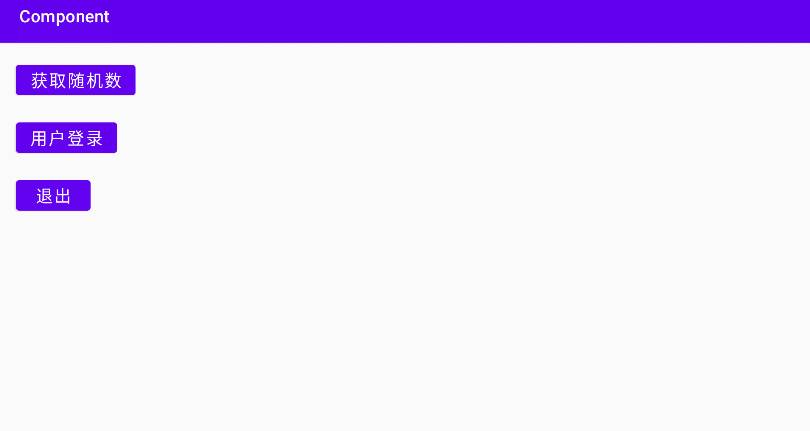
点击 “获取随机数” 按钮,服务类中获取到随机数后返回客户端,在界面上采用 Toast 提示。点击 “登录” 按钮,在服务类中进行登录后,结果返回界面采用 Toast 提示。











暂无评论内容