

第一说明的是以下提供的方法具有时效性。
1. Chrome或Edge浏览器标签
截止到2022年11月11日,以下脚本均有效。
javascript:var follow_text=document.getElementsByClassName( follow-text )[0];if(follow_text && follow_text.parentElement){document.querySelector("#article_content").removeAttribute("style");follow_text.parentElement.parentElement.removeChild(follow_text.parentElement);var hide_article_box=document.getElementsByClassName( hide-article-box )[0];hide_article_box.parentElement.removeChild(hide_article_box);}window.oncontextmenu=document.oncontextmenu=document.oncopy=null; [...document.querySelectorAll( body )].forEach(dom => dom.outerHTML = dom.outerHTML); [...document.querySelectorAll( body, body * )].forEach(dom => {[ onselect , onselectstart , onselectend , ondragstart , ondragend , oncontextmenu , oncopy ].forEach(ev => dom.removeAttribute(ev)); dom.style[ user-select ]= auto ;});
截止到2022年6月16日,以下脚本均有效。(注:已失效,到20221113在Google浏览器版本 109.0.5410.0(正式版本)dev (64 位)依然有效)
javascript:document.querySelector( .hide-article-pos ).remove();document.querySelector( #article_content ).style.height=  ;document.querySelectorAll(".prism").forEach((b)=>{b.onclick = function(e){mdcp.copyCode(e)}});
document.querySelectorAll("style").forEach((s)=>{if((s.innerText||"").indexOf( #content_views pre )>-1){s.parentElement.removeChild(s)}});
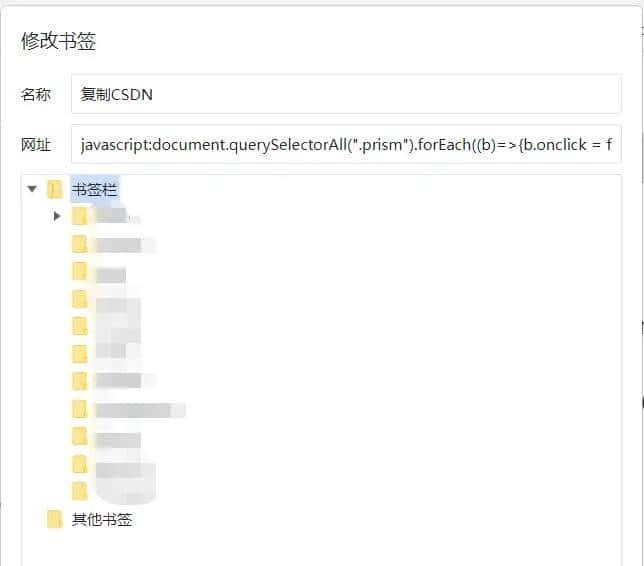
2. 通过浏览器控制台删除 id=“content_views”
可跳转到如下地址
https://tenten.blog.csdn.net/article/details/121318057
3. 在开发者控制台打开浏览器文档的设计模式
这里主要利用浏览器内在特性,将请求的HTML页面所在的浏览器内的设计模式打开,这样我们就能够获得该页面的更多权限,不但能够复制,还能够修改和删除,甚至基于该页面再次开发。因此需要在该博客页面按 F12或者鼠标右键->检查 来打开浏览器自带的开发者控制台(DevTools),点击Console按钮,在控制台界面输入一行命令即可:document.designMode= on 。https://blog.csdn.net/demo_code_der/article/details/123323587
如果不需要他人CSDN博客里的代码了,可以思考将浏览器的设计模式关闭,在开发者控制台输入document.designMode= off 即可,此时将无法复制别人CSDN博客里面的代码。
4.采用油猴插件+脚本
© 版权声明
文章版权归作者所有,未经允许请勿转载。如内容涉嫌侵权,请在本页底部进入<联系我们>进行举报投诉!
THE END




![在苹果iPhone手机上编写ios越狱插件deb[超简单] - 鹿快](https://img.lukuai.com/blogimg/20251123/23f740f048644a198a64e73eeaa43e60.jpg)













暂无评论内容