

项目场景:
Gazebo中仿真运行LIO-SAM,实现扫描建图,获取PCD文件,并使用Octomap将点云地图pcd转换为三维栅格地图
运行过程:
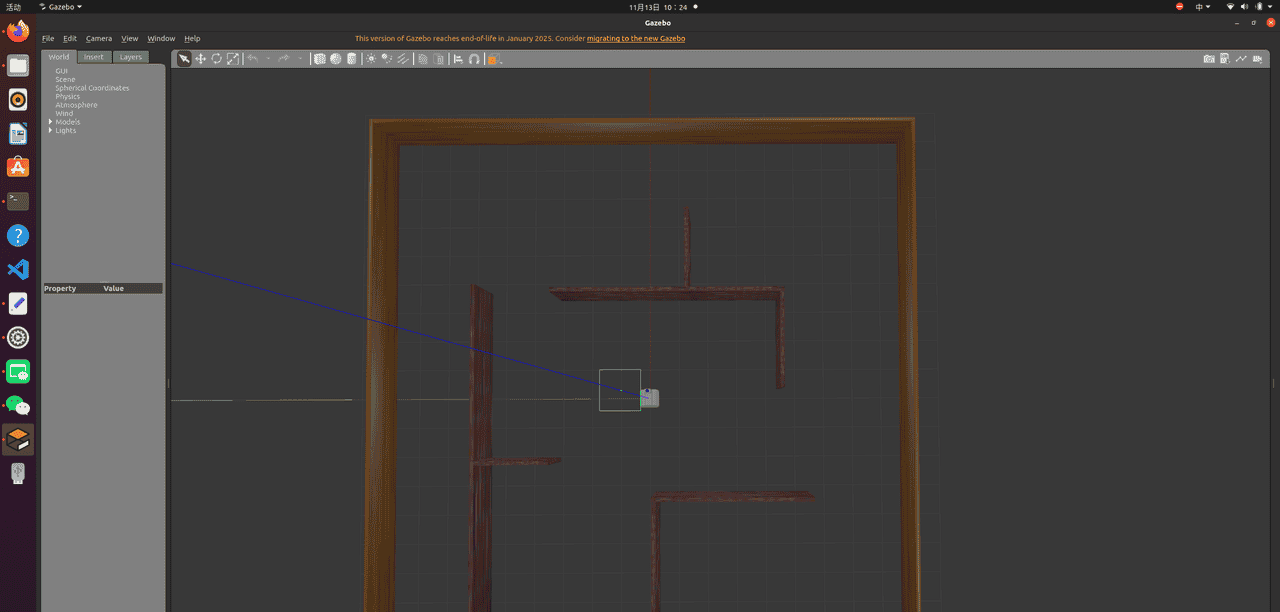
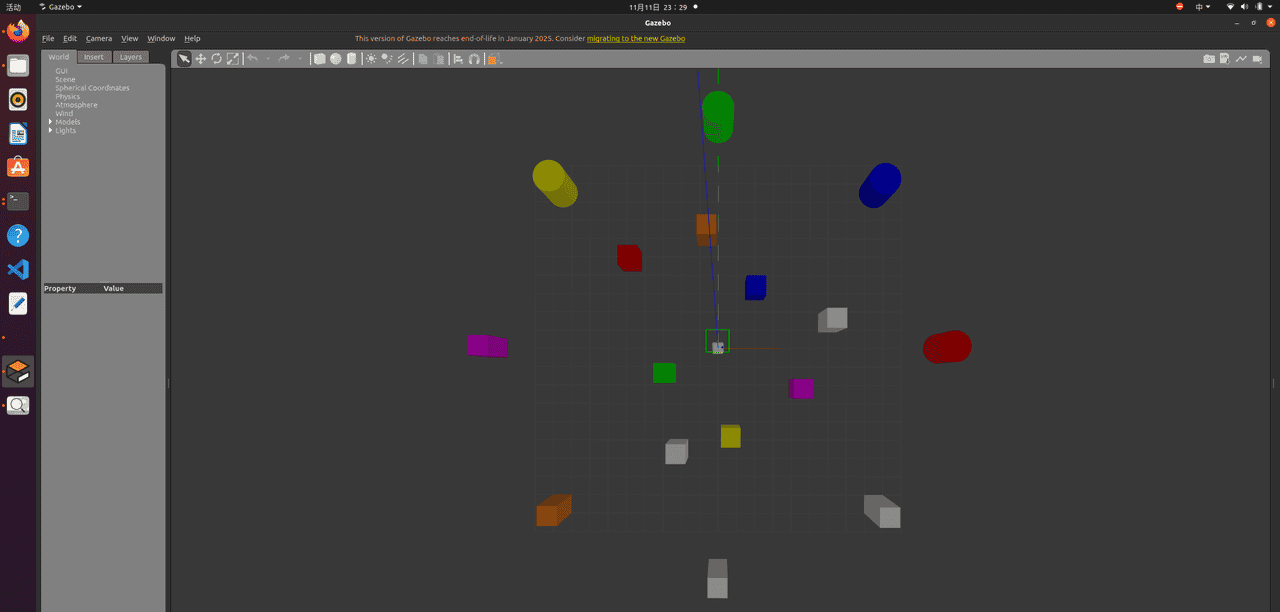
1.启动仿真环境并加载机器人
(1)室内
(2)室外
2. 修改LIO-SAM配置文件,并编写launch文件运行
打开文件:/LIO-SAM/config/params.yaml,修改部分配置以配合gazebo仿真及PCD文件保存配置
1. 话题选择
2. Frames选择
3. PCD文件保存配置
4. 传感器内外参设置
#话题选择
# Topics
pointCloudTopic: "/velodyne_points"
imuTopic: "/imu/data"
odomTopic: "odometry/imu"
gpsTopic: "odometry/gpsz"

#Frames选择
# Frames
lidarFrame: "3Dlidar_link"
baselinkFrame: "base_link"
odometryFrame: "odom"
mapFrame: "map"

# PCD文件保存配置
# Export settings
savePCD: true
savePCDDirectory: "/pcd/"

# 传感器内外参设置
# Sensor Settings
sensor: velodyne
N_SCAN: 16
Horizon_SCAN: 1800
downsampleRate: 1
lidarMinRange: 0.5
lidarMaxRange: 100.0

# IMU Settings
imuAccNoise: 3.9939570888238808e-03
imuGyrNoise: 1.5636343949698187e-03
imuAccBiasN: 6.4356659353532566e-05
imuGyrBiasN: 3.5640318696367613e-05
imuGravity: 9.80511
imuRPYWeight: 0.01

# Extrinsics: T_lb (lidar -> imu)
extrinsicTrans: [0.24, 0.0, 1.195]
extrinsicRot: [1, 0, 0,
                0, 1, 0,
                0, 0, 1]
extrinsicRPY: [1, 0, 0,
                0, 1, 0,
                0, 0, 1]
为了避免尚未完全生成PCD文件ROS就已关闭节点的情况,还需要调高 TIMEOUT_SIGINT 值。用以下命令打开对应文件,修改后保存并退出
修改:找到 DEFAULT_TIMEOUT_SIGINT ,我的默认为 15,修改其值为60或100都行
sudo gedit /opt/ros/noetic/lib/python3/dist-packages/roslaunch/nodeprocess.py
编写launch运行文件
<launch>
    <!-- 1. 加载URDF模型(关键:提供robot_state_publisher所需的URDF) -->
    <param name="robot_description" command="$(find xacro)/xacro $(find robot_assistant_simple_bringup)/urdf/robot_assistant_simple_total.urdf.xacro" />

    <!-- 2. 启动关节状态和TF发布节点(与直接运行时一致) -->
    <!-- <node pkg="joint_state_publisher" type="joint_state_publisher" name="joint_state_publisher" output="screen">
        <param name="use_sim_time" value="true" />
    </node> -->
    <node pkg="robot_state_publisher" type="robot_state_publisher" name="robot_state_publisher" output="screen">
        <param name="use_sim_time" value="true" />
    </node>

    <!-- 3. 加载LIO-SAM参数(与直接运行时一致) -->
    <rosparam file="$(find lio_sam)/config/params.yaml" command="load" />

    <!-- 4. 启用仿真时间 -->
    <param name="use_sim_time" value="true" />

    <!-- 5. 启动LIO-SAM核心模块和RViz -->
    <include file="$(find lio_sam)/launch/include/module_loam.launch" />
    <include file="$(find lio_sam)/launch/include/module_rviz.launch">
        <param name="use_sim_time" value="true" />
    </include>
</launch>
3. 键盘控制机器人移动完成扫描
rosrun teleop_twist_keyboard teleop_twist_keyboard.py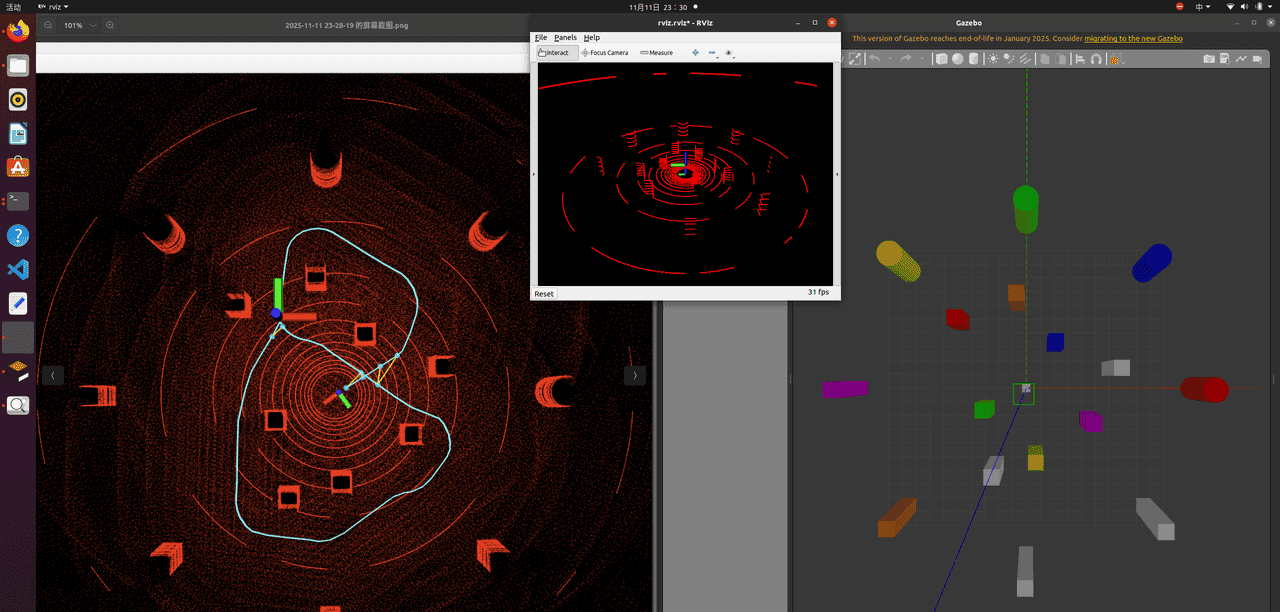
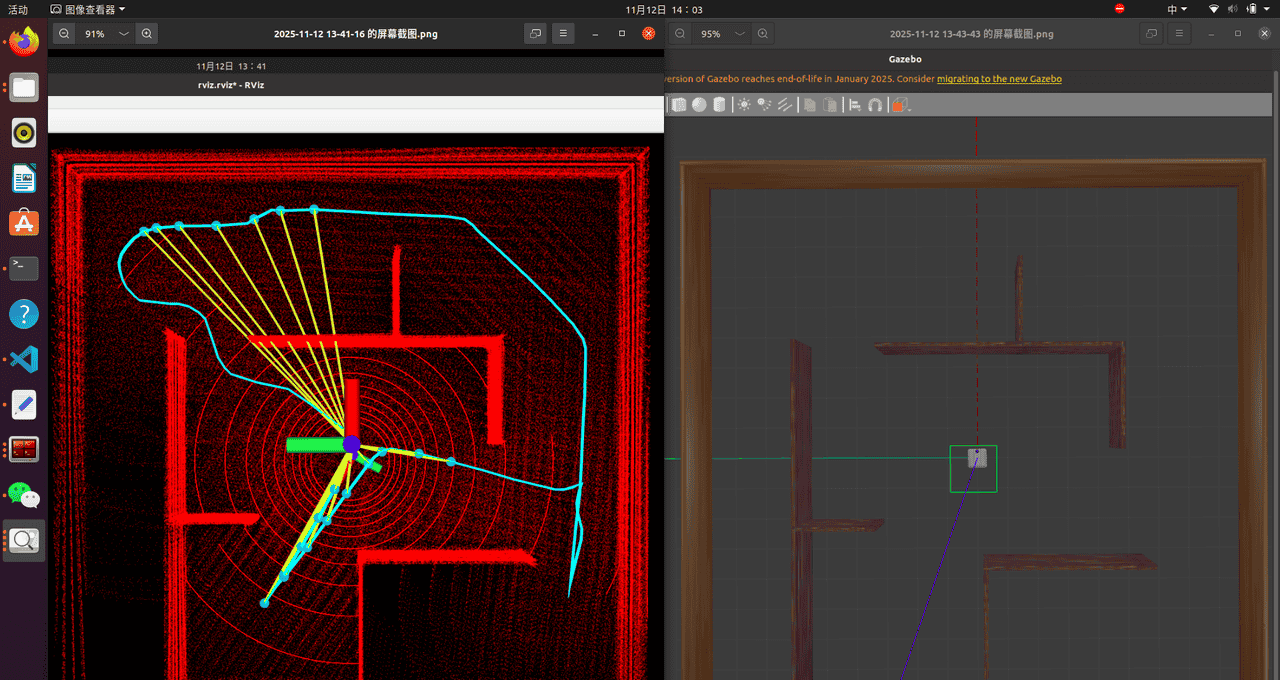
完成后点击ctrl-c退出,PCD文件将保存到你选择的路径中

4. 查看PCD文件
pcl_viewer ***.pcd
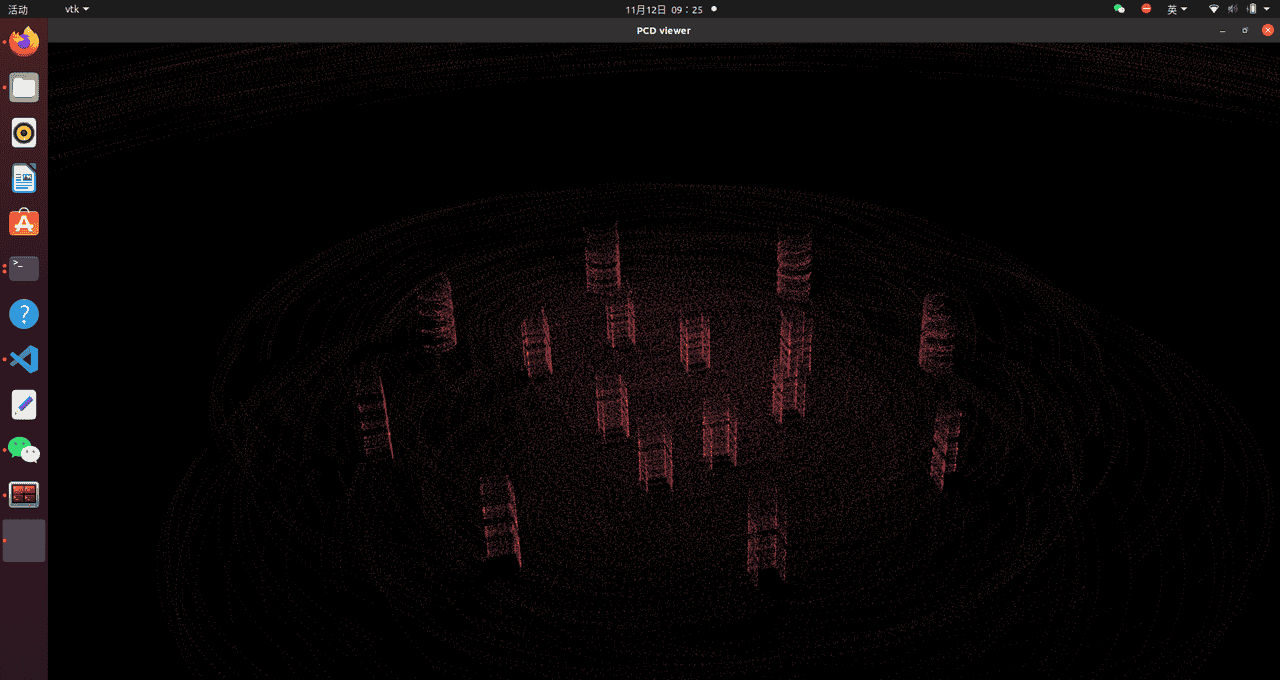
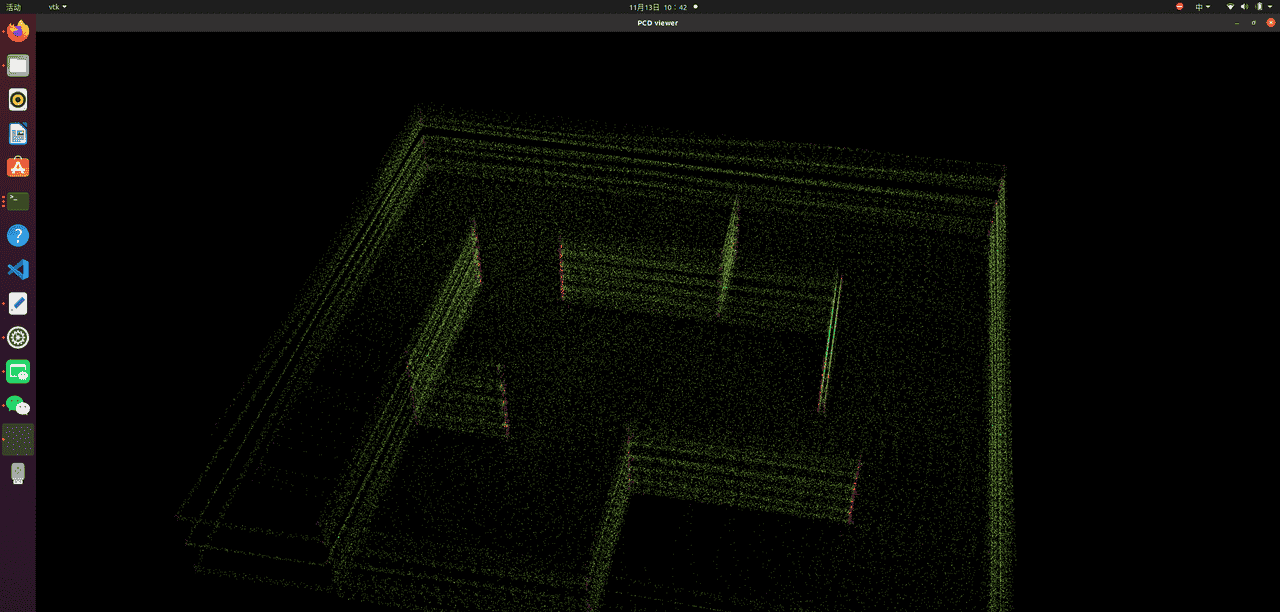
5. 使用Octomap将点云地图pcd转换为三维栅格地图
以下步骤参考博客:(在部分配置中根据我个人需求作出了修改)
https://blog.csdn.net/Hanamizukimr/article/details/140545091?spm=1001.2014.3001.5506
在工作空间src中放入以下两个功能包
octomap_mapping
octomap_server
github地址:https://github.com/OctoMap/octomap_mapping/tree/kinetic-devel
(一定要选择kinetic-devel分支,才支持ROS1)
创建功能包
cd src
catkin_create_pkg pointcloud_publish std_msgs roscpp
src下创建cpp文件pointcloud_publisher.cpp
#include <iostream>
#include <string>
#include <stdlib.h>
#include <stdio.h>
#include <sstream>
#include <vector>

#include <ros/ros.h>
#include <pcl/point_cloud.h>
#include <pcl_conversions/pcl_conversions.h>
#include <sensor_msgs/PointCloud2.h>
#include <pcl/io/pcd_io.h>

#include <octomap_msgs/OctomapWithPose.h>
#include <octomap_msgs/Octomap.h>
#include <geometry_msgs/Pose.h>

#include <octomap/octomap.h>
#include <octomap_msgs/Octomap.h>
#include <octomap_msgs/conversions.h>

#include <geometry_msgs/TransformStamped.h>

#define TESTCLOUDPOINTS 1  // 设置为 1 以测试点云发布,设置为 0 不测试
#define TESTOCTOTREE 0     // 设置为 1 以测试OctoMap发布,设置为 0 不测试

int main (int argc, char **argv)
{
    std::string topic, path, frame_id;
    int hz = 5;  // 发布频率,单位 Hz

    ros::init(argc, argv, "publish_pointcloud");  // 初始化ROS节点
    ros::NodeHandle nh;  // 创建节点句柄

    // 从参数服务器获取参数
    nh.param<std::string>("path", path, "/home/leavezr/pcd/GlobalMap.pcd");
    nh.param<std::string>("frame_id", frame_id, "map");
    nh.param<std::string>("topic", topic, "pointcloud_topic");
    nh.param<int>("hz", hz, 5);

    // 加载点云数据到pcl::PointCloud对象中
    pcl::PointCloud<pcl::PointXYZ> pcl_cloud;
    pcl::io::loadPCDFile(path, pcl_cloud);  // 从文件加载点云数据

#if TESTCLOUDPOINTS  // 如果 TESTCLOUDPOINTS 定义为 1,则执行这部分代码
    ros::Publisher pcl_pub = nh.advertise<sensor_msgs::PointCloud2>(topic, 10);  // 创建Publisher对象,将点云数据发布到指定话题

    // 转换PCL点云到ROS下的 PointCloud2 类型
    sensor_msgs::PointCloud2 output;
    pcl::toROSMsg(pcl_cloud, output);

    output.header.stamp = ros::Time::now();  // 设置时间戳
    output.header.frame_id = frame_id;  // 设置坐标系框架

    // 打印参数信息
    std::cout << "path = " << path << std::endl;
    std::cout << "frame_id = " << frame_id << std::endl;
    std::cout << "topic = " << topic << std::endl;
    std::cout << "hz = " << hz << std::endl;

    ros::Rate loop_rate(hz);  // 设置发布频率
    while (ros::ok())
    {
        pcl_pub.publish(output);  // 发布 PointCloud2 数据
        ros::spinOnce();  // 处理所有回调函数
        loop_rate.sleep();  // 按照指定频率睡眠
    }
#endif

#if TESTOCTOTREE  // 如果 TESTOCTOTREE 定义为 1,则执行这部分代码
    ros::Publisher octomap_pub = nh.advertise<octomap_msgs::Octomap>(topic, 1);  // 创建Publisher对象,将OctoMap数据发布到指定话题

    // 创建 octomap 对象,并设置其分辨率
    octomap::OcTree tree(0.1);  // 你可以根据需要调整分辨率

    // 将点云数据插入到 octomap 中
    for (const auto& point : pcl_cloud.points) {
        tree.updateNode(point.x, point.y, point.z, true);
    }

    // 发布OctoMap消息
    octomap_msgs::Octomap octomap_msg;
    octomap_msgs::fullMapToMsg(tree, octomap_msg);  // 转换为 OctoMap 消息

    // 设置 OctoMap 消息的头信息
    octomap_msg.header.stamp = ros::Time::now();
    octomap_msg.header.frame_id = frame_id;

    // 打印参数信息
    std::cout << "path = " << path << std::endl;
    std::cout << "frame_id = " << frame_id << std::endl;
    std::cout << "topic = " << topic << std::endl;
    std::cout << "hz = " << hz << std::endl;

    ros::Rate loop_rate(hz);  // 设置发布频率
    while (ros::ok())
    {
        octomap_pub.publish(octomap_msg);  // 发布 OctoMap 数据
        ros::spinOnce();  // 处理所有回调函数
        loop_rate.sleep();  // 按照指定频率睡眠
    }
#endif

    return 0;  // 主函数返回值
}
CMakeLists.txt
cmake_minimum_required(VERSION 3.0.2)
project(pointcloud_publish)

## Compile as C++11, supported in ROS Kinetic and newer
# add_compile_options(-std=c++11)

## Find catkin macros and libraries
## if COMPONENTS list like find_package(catkin REQUIRED COMPONENTS xyz)
## is used, also find other catkin packages

set(octomap_ros_DIR "/opt/ros/noetic/share/octomap_ros/cmake")

find_package(catkin REQUIRED COMPONENTS
  roscpp
  std_msgs
  sensor_msgs
  octomap_msgs
  geometry_msgs
  octomap_ros
)
find_package(PCL REQUIRED)
find_package(octomap REQUIRED)

## System dependencies are found with CMake's conventions
# find_package(Boost REQUIRED COMPONENTS system)


## Uncomment this if the package has a setup.py. This macro ensures
## modules and global scripts declared therein get installed
## See http://ros.org/doc/api/catkin/html/user_guide/setup_dot_py.html
# catkin_python_setup()

################################################
## Declare ROS messages, services and actions ##
################################################

## To declare and build messages, services or actions from within this
## package, follow these steps:
## * Let MSG_DEP_SET be the set of packages whose message types you use in
##   your messages/services/actions (e.g. std_msgs, actionlib_msgs, ...).
## * In the file package.xml:
##   * add a build_depend tag for "message_generation"
##   * add a build_depend and a exec_depend tag for each package in MSG_DEP_SET
##   * If MSG_DEP_SET isn't empty the following dependency has been pulled in
##     but can be declared for certainty nonetheless:
##     * add a exec_depend tag for "message_runtime"
## * In this file (CMakeLists.txt):
##   * add "message_generation" and every package in MSG_DEP_SET to
##     find_package(catkin REQUIRED COMPONENTS ...)
##   * add "message_runtime" and every package in MSG_DEP_SET to
##     catkin_package(CATKIN_DEPENDS ...)
##   * uncomment the add_*_files sections below as needed
##     and list every .msg/.srv/.action file to be processed
##   * uncomment the generate_messages entry below
##   * add every package in MSG_DEP_SET to generate_messages(DEPENDENCIES ...)

## Generate messages in the 'msg' folder
# add_message_files(
#   FILES
#   Message1.msg
#   Message2.msg
# )

## Generate services in the 'srv' folder
# add_service_files(
#   FILES
#   Service1.srv
#   Service2.srv
# )

## Generate actions in the 'action' folder
# add_action_files(
#   FILES
#   Action1.action
#   Action2.action
# )

## Generate added messages and services with any dependencies listed here
# generate_messages(
#   DEPENDENCIES
#   std_msgs
# )

################################################
## Declare ROS dynamic reconfigure parameters ##
################################################

## To declare and build dynamic reconfigure parameters within this
## package, follow these steps:
## * In the file package.xml:
##   * add a build_depend and a exec_depend tag for "dynamic_reconfigure"
## * In this file (CMakeLists.txt):
##   * add "dynamic_reconfigure" to
##     find_package(catkin REQUIRED COMPONENTS ...)
##   * uncomment the "generate_dynamic_reconfigure_options" section below
##     and list every .cfg file to be processed

## Generate dynamic reconfigure parameters in the 'cfg' folder
# generate_dynamic_reconfigure_options(
#   cfg/DynReconf1.cfg
#   cfg/DynReconf2.cfg
# )

###################################
## catkin specific configuration ##
###################################
## The catkin_package macro generates cmake config files for your package
## Declare things to be passed to dependent projects
## INCLUDE_DIRS: uncomment this if your package contains header files
## LIBRARIES: libraries you create in this project that dependent projects also need
## CATKIN_DEPENDS: catkin_packages dependent projects also need
## DEPENDS: system dependencies of this project that dependent projects also need
catkin_package(
#  INCLUDE_DIRS include
#  LIBRARIES my_pkg
#  CATKIN_DEPENDS roscpp std_msgs
#  DEPENDS system_lib
)

###########
## Build ##
###########

## Specify additional locations of header files
## Your package locations should be listed before other locations
include_directories(
# include
  ${catkin_INCLUDE_DIRS}
  ${PCL_INCLUDE_DIRS}
  ${OCTOMAP_INCLUDE_DIRS}
)

## Declare a C++ library
# add_library(${PROJECT_NAME}
#   src/${PROJECT_NAME}/my_pkg.cpp
# )

## Add cmake target dependencies of the library
## as an example, code may need to be generated before libraries
## either from message generation or dynamic reconfigure
# add_dependencies(${PROJECT_NAME} ${${PROJECT_NAME}_EXPORTED_TARGETS} ${catkin_EXPORTED_TARGETS})

## Declare a C++ executable
## With catkin_make all packages are built within a single CMake context
## The recommended prefix ensures that target names across packages don't collide
add_executable(publish_pointcloud src/pointcloud_publisher.cpp)

## Rename C++ executable without prefix
## The above recommended prefix causes long target names, the following renames the
## target back to the shorter version for ease of user use
## e.g. "rosrun someones_pkg node" instead of "rosrun someones_pkg someones_pkg_node"
# set_target_properties(${PROJECT_NAME}_node PROPERTIES OUTPUT_NAME node PREFIX "")

## Add cmake target dependencies of the executable
## same as for the library above
# add_dependencies(${PROJECT_NAME}_node ${${PROJECT_NAME}_EXPORTED_TARGETS} ${catkin_EXPORTED_TARGETS})

## Specify libraries to link a library or executable target against
target_link_libraries(publish_pointcloud
  ${catkin_LIBRARIES}
  ${PCL_LIBRARIES}
  ${OCTOMAP_LIBRARIES}
)

#############
## Install ##
#############

# all install targets should use catkin DESTINATION variables
# See http://ros.org/doc/api/catkin/html/adv_user_guide/variables.html

## Mark executable scripts (Python etc.) for installation
## in contrast to setup.py, you can choose the destination
# catkin_install_python(PROGRAMS
#   scripts/my_python_script
#   DESTINATION ${CATKIN_PACKAGE_BIN_DESTINATION}
# )

## Mark executables for installation
## See http://docs.ros.org/melodic/api/catkin/html/howto/format1/building_executables.html
# install(TARGETS ${PROJECT_NAME}_node
#   RUNTIME DESTINATION ${CATKIN_PACKAGE_BIN_DESTINATION}
# )

## Mark libraries for installation
## See http://docs.ros.org/melodic/api/catkin/html/howto/format1/building_libraries.html
# install(TARGETS ${PROJECT_NAME}
#   ARCHIVE DESTINATION ${CATKIN_PACKAGE_LIB_DESTINATION}
#   LIBRARY DESTINATION ${CATKIN_PACKAGE_LIB_DESTINATION}
#   RUNTIME DESTINATION ${CATKIN_GLOBAL_BIN_DESTINATION}
# )

## Mark cpp header files for installation
# install(DIRECTORY include/${PROJECT_NAME}/
#   DESTINATION ${CATKIN_PACKAGE_INCLUDE_DESTINATION}
#   FILES_MATCHING PATTERN "*.h"
#   PATTERN ".svn" EXCLUDE
# )

## Mark other files for installation (e.g. launch and bag files, etc.)
# install(FILES
#   # myfile1
#   # myfile2
#   DESTINATION ${CATKIN_PACKAGE_SHARE_DESTINATION}
# )

#############
## Testing ##
#############

## Add gtest based cpp test target and link libraries
# catkin_add_gtest(${PROJECT_NAME}-test test/test_my_pkg.cpp)
# if(TARGET ${PROJECT_NAME}-test)
#   target_link_libraries(${PROJECT_NAME}-test ${PROJECT_NAME})
# endif()

## Add folders to be run by python nosetests
# catkin_add_nosetests(test)
package.xml
<?xml version="1.0"?>
<package format="2">
  <name>pointcloud_publish</name>
  <version>0.0.0</version>
  <description>The pointcloud_publish package</description>

  <!-- One maintainer tag required, multiple allowed, one person per tag -->
  <!-- Example:  -->
  <!-- <maintainer email="jane.doe@example.com">Jane Doe</maintainer> -->
  <maintainer email="leavezr@todo.todo">leavezr</maintainer>


  <!-- One license tag required, multiple allowed, one license per tag -->
  <!-- Commonly used license strings: -->
  <!--   BSD, MIT, Boost Software License, GPLv2, GPLv3, LGPLv2.1, LGPLv3 -->
  <license>TODO</license>


  <!-- Url tags are optional, but multiple are allowed, one per tag -->
  <!-- Optional attribute type can be: website, bugtracker, or repository -->
  <!-- Example: -->
  <!-- <url type="website">http://wiki.ros.org/pointcloud_publish</url> -->


  <!-- Author tags are optional, multiple are allowed, one per tag -->
  <!-- Authors do not have to be maintainers, but could be -->
  <!-- Example: -->
  <!-- <author email="jane.doe@example.com">Jane Doe</author> -->


  <!-- The *depend tags are used to specify dependencies -->
  <!-- Dependencies can be catkin packages or system dependencies -->
  <!-- Examples: -->
  <!-- Use depend as a shortcut for packages that are both build and exec dependencies -->
  <!--   <depend>roscpp</depend> -->
  <!--   Note that this is equivalent to the following: -->
  <!--   <build_depend>roscpp</build_depend> -->
  <!--   <exec_depend>roscpp</exec_depend> -->
  <!-- Use build_depend for packages you need at compile time: -->
  <!--   <build_depend>message_generation</build_depend> -->
  <!-- Use build_export_depend for packages you need in order to build against this package: -->
  <!--   <build_export_depend>message_generation</build_export_depend> -->
  <!-- Use buildtool_depend for build tool packages: -->
  <!--   <buildtool_depend>catkin</buildtool_depend> -->
  <!-- Use exec_depend for packages you need at runtime: -->
  <!--   <exec_depend>message_runtime</exec_depend> -->
  <!-- Use test_depend for packages you need only for testing: -->
  <!--   <test_depend>gtest</test_depend> -->
  <!-- Use doc_depend for packages you need only for building documentation: -->
  <!--   <doc_depend>doxygen</doc_depend> -->
  <buildtool_depend>catkin</buildtool_depend>
  <build_depend>roscpp</build_depend>
  <build_depend>std_msgs</build_depend>
  <build_export_depend>roscpp</build_export_depend>
  <build_export_depend>std_msgs</build_export_depend>
  <exec_depend>roscpp</exec_depend>
  <exec_depend>std_msgs</exec_depend>


  <!-- The export tag contains other, unspecified, tags -->
  <export>
    <!-- Other tools can request additional information be placed here -->

  </export>
</package>
编译
cd 工作空间

catkin_make
编写launch文件:
octomap_server.launch
<launch>
  <node pkg="octomap_server" type="octomap_server_node" name="octomap_server">

    <!-- resolution in meters per pixel -->
    <param name="resolution" value="0.2" />

    <!-- name of the fixed frame, needs to be "/map" for SLAM -->
    <param name="frame_id" type="string" value="map" />

    <!-- max range / depth resolution of the kinect in meter -->
    <param name="sensor_model/max_range" value="100.0" />
    <param name="latch" value="true" />

    <!-- max/min height for occupancy map, should be in meters -->
    <param name="pointcloud_max_z" value="1000" />
    <param name="pointcloud_min_z" value="-2" />

    <!-- topic from where pointcloud2 messages are subscribed -->
    <remap from="/cloud_in" to="pointcloud_topic" />

  </node>
</launch>
安装octomap插件
sudo apt-get install ros-indigo-octomap-rviz-plugins运行
roscore

rosrun pointcloud_publish publish_pointcloud

roslaunch pointcloud_publish octomap_server.launch

rviz
在rviz中修改Fixed Frame 为之前设置的坐标系map
点Add添加OccupancyGrid,订阅/octomap_full话题
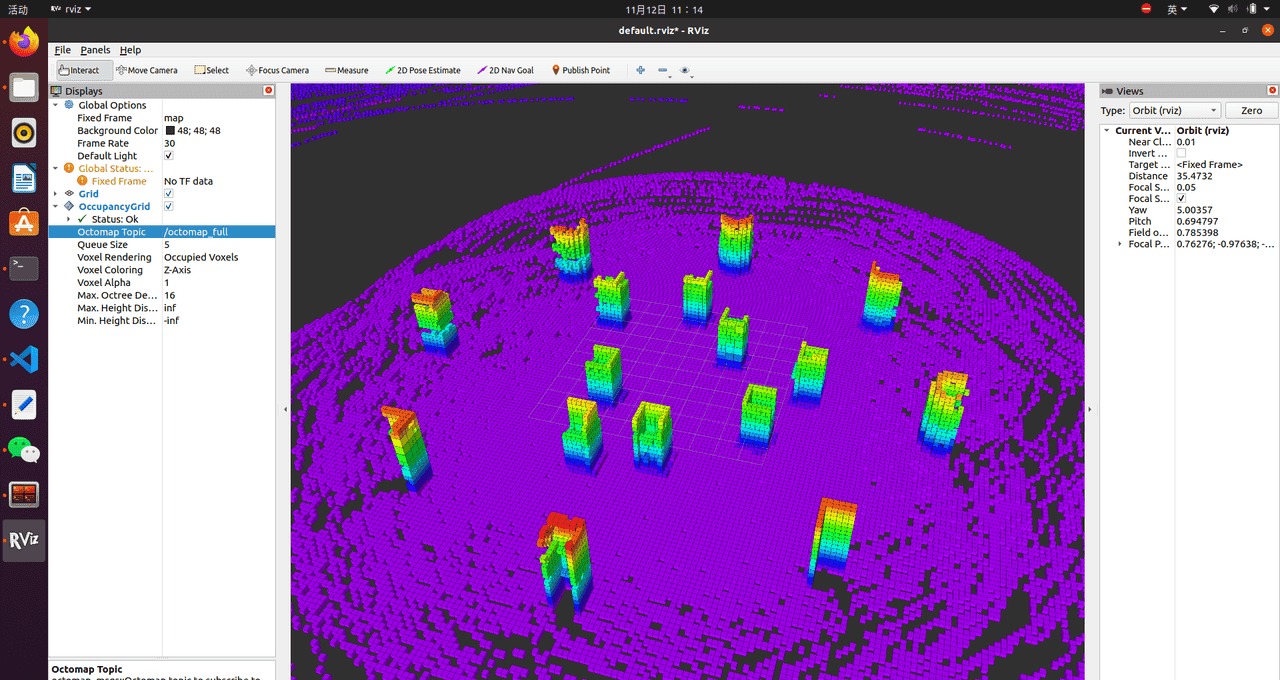
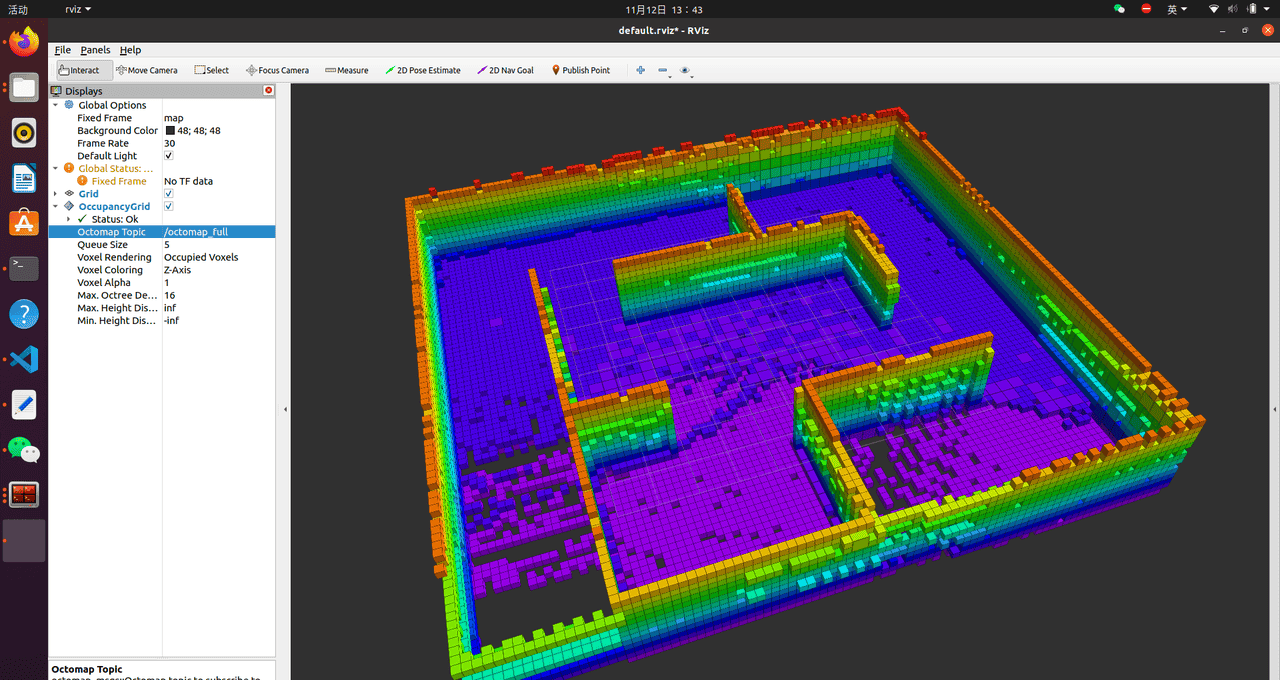
6. 八叉树转换为.gt文件
roslaunch lio_sam run.launch

rosbag play XXX.bag  #或者键盘控制完成建图

#建图完成后(降低分辨率,减轻电脑负担):
rosrun octomap_server octomap_server_node cloud_in:=/lio_sam/mapping/cloud_registered _resolution:=0.2

#.bt保存完成后:
rosrun octomap_server octomap_saver -f ~/map1.bt
7. .bt文件转为.pgm和.yaml
rosrun octomap_server octomap_server_node ~/map1.bt

rosrun map_server map_saver -f ~/map1 map:=/projected_map

![在苹果iPhone手机上编写ios越狱插件deb[超简单] - 鹿快](https://img.lukuai.com/blogimg/20251123/23f740f048644a198a64e73eeaa43e60.jpg)













暂无评论内容