

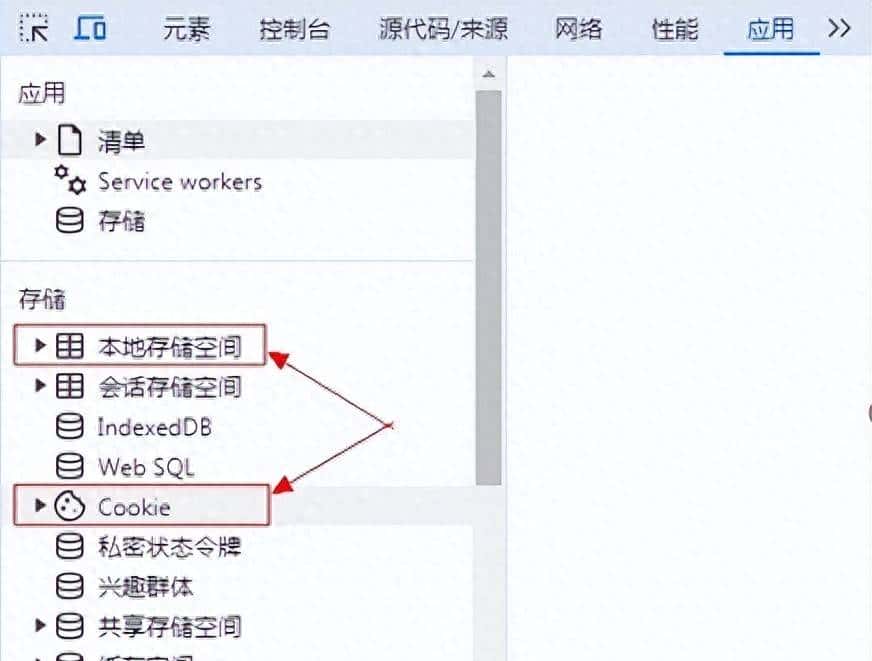
浏览器上的本地存储空间 和 Cooke
在 Blazor Server 项目中,关于用户信息存储的选择,我来为你详细分析一下:
1. 存储方案对比
Cookie
// 设置Cookie
public async Task SetUserCookie(string username)
{
var claims = new List<Claim>
{
new Claim(ClaimTypes.Name, username),
new Claim(ClaimTypes.Role, “User”)
};
var claimsIdentity = new ClaimsIdentity(claims, CookieAuthenticationDefaults.AuthenticationScheme);
var authProperties = new AuthenticationProperties
{
IsPersistent = true,
ExpiresUtc = DateTimeOffset.UtcNow.AddHours(2)
};
await HttpContext.SignInAsync(
CookieAuthenticationDefaults.AuthenticationScheme,
new ClaimsPrincipal(claimsIdentity),
authProperties);
}
“`
本地存储 (LocalStorage)
// 使用本地存储
@inject IJSRuntime JSRuntime
private async Task SaveToLocalStorage(string key, string value)
{
await JSRuntime.InvokeVoidAsync(“localStorage.setItem”, key, value);
}
private async Task<string> GetFromLocalStorage(string key)
{
return await JSRuntime.InvokeAsync<string>(“localStorage.getItem”, key);
}
2. 主要区别
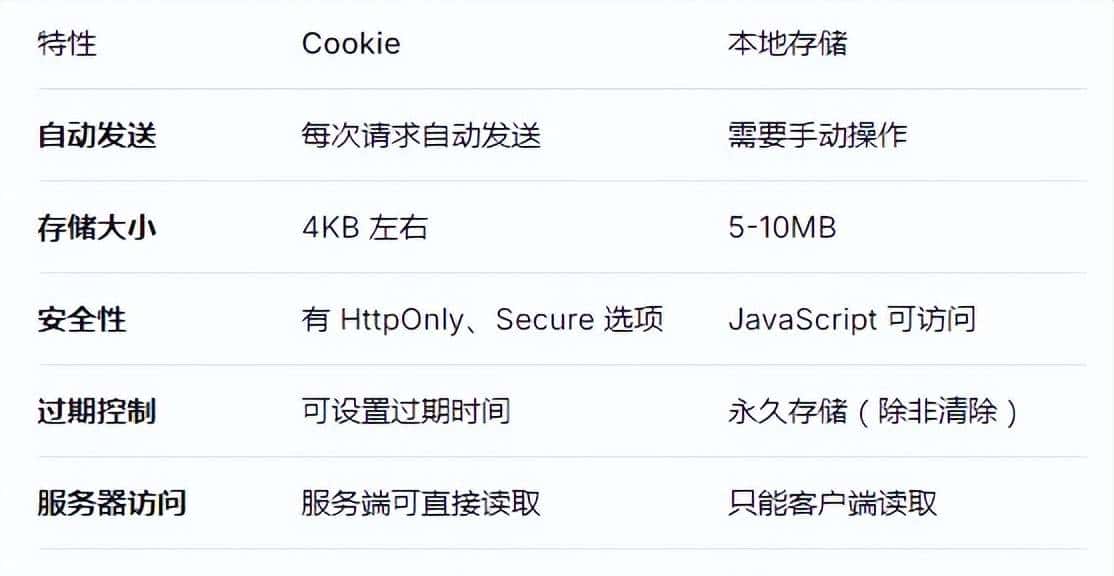
本地存储空间和Cooke区别
3. 推荐方案
对于登录用户信息,**强烈推荐使用 Cookie**
理由:
(1)安全性更高
// 安全的Cookie配置
services.AddAuthentication(CookieAuthenticationDefaults.AuthenticationScheme)
.AddCookie(options =>
{
options.Cookie.HttpOnly = true; // 防止XSS
options.Cookie.SecurePolicy = CookieSecurePolicy.Always; // 仅HTTPS
options.Cookie.SameSite = SameSiteMode.Strict; // CSRF保护
options.ExpireTimeSpan = TimeSpan.FromHours(2);
});
(2) 服务器端直接访问
// 在组件中获取用户信息
[CascadingParameter]
private Task<AuthenticationState> AuthenticationStateTask { get; set; }
private async Task<string> GetUserName()
{
var authState = await AuthenticationStateTask;
return authState.User.Identity.Name;
}
(3) 自动管理
// 注销时自动清理
public async Task Logout()
{
await HttpContext.SignOutAsync(CookieAuthenticationDefaults.AuthenticationScheme);
}
“`
4. 实际应用提议
主要使用 Cookie
// Program.cs 配置
builder.Services.AddAuthentication(CookieAuthenticationDefaults.AuthenticationScheme)
.AddCookie(options =>
{
options.LoginPath = “/login”;
options.AccessDeniedPath = “/access-denied”;
options.Cookie.Name = “YourApp.Auth”;
options.Cookie.HttpOnly = true;
options.Cookie.SecurePolicy = CookieSecurePolicy.Always;
});
builder.Services.AddScoped<AuthenticationStateProvider, CookieAuthenticationStateProvider>();
辅助使用本地存储(非敏感信息)
// 存储UI偏好设置等
public class UserPreferencesService
{
private readonly IJSRuntime _jsRuntime;
public async Task SaveThemePreference(string theme)
{
await _jsRuntime.InvokeVoidAsync(“localStorage.setItem”, “theme”, theme);
}
public async Task<string> GetThemePreference()
{
return await _jsRuntime.InvokeAsync<string>(“localStorage.getItem”, “theme”);
}
}
5. 总结提议
●用户认证信息**:使用 Cookie(安全性、服务器访问)
●敏感数据**:使用 Cookie(HttpOnly 保护)
●客户端偏好设置**:使用本地存储(大容量、客户端专用)
●临时非敏感数据**:使用本地存储
综上所述,在 Blazor Server 项目中,Cookie 是存储登录用户信息的**最佳选择**,由于它提供了更好的安全性和与服务器端的无缝集成。













暂无评论内容