

在教学小学五年级数学”三角形面积的计算公式”这个内容时,通过图形推导,指导学生理解三角形的面积等于平行四边形面积的一半,从而得出面积公式:三角形面积 = 底 × 高 ÷ 2,那么,不管什么形状的三角形,计算面积时只要知道底和高的长度,就能计算面积,也就说:三角形的面积只与它的底和高有关,与形状无关。
许多学生对这个并不是很理解,因此在教学课件中,就需要能演示“等底等高的三角形面积相等”,普通的课件无法动画操作,特别是三角形的变形操作,用几何画板的功能才能实现。
下面分享一个用AI编写的HTML程序代码,用于理解小学数学“等底等高的三角形面积相等”这个知识点。
- 程序特点:
1.可以通过交互式演示,拖动顶点C或底边点A和点B的位置,调整三角形的形状。直观理解三角形面积公式和性质。
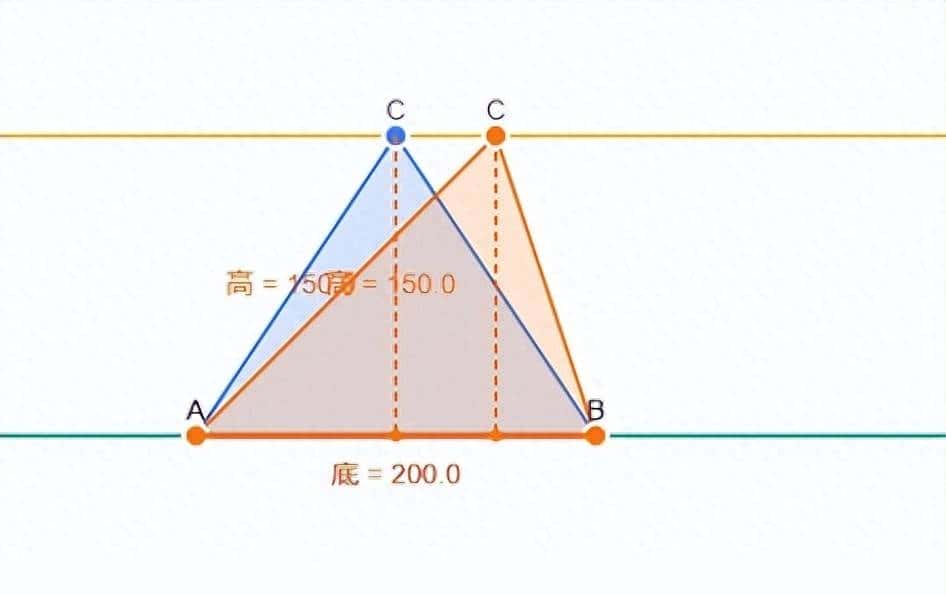
默认显示蓝色三角形和橙色三角形,底边长200,高150,拖动顶点C,调整2个三角形的形状,其底边和高的长度不变,面积也不变。面积在下方直接计算显示,可随着三角形形状的变化直接动态计算面积。
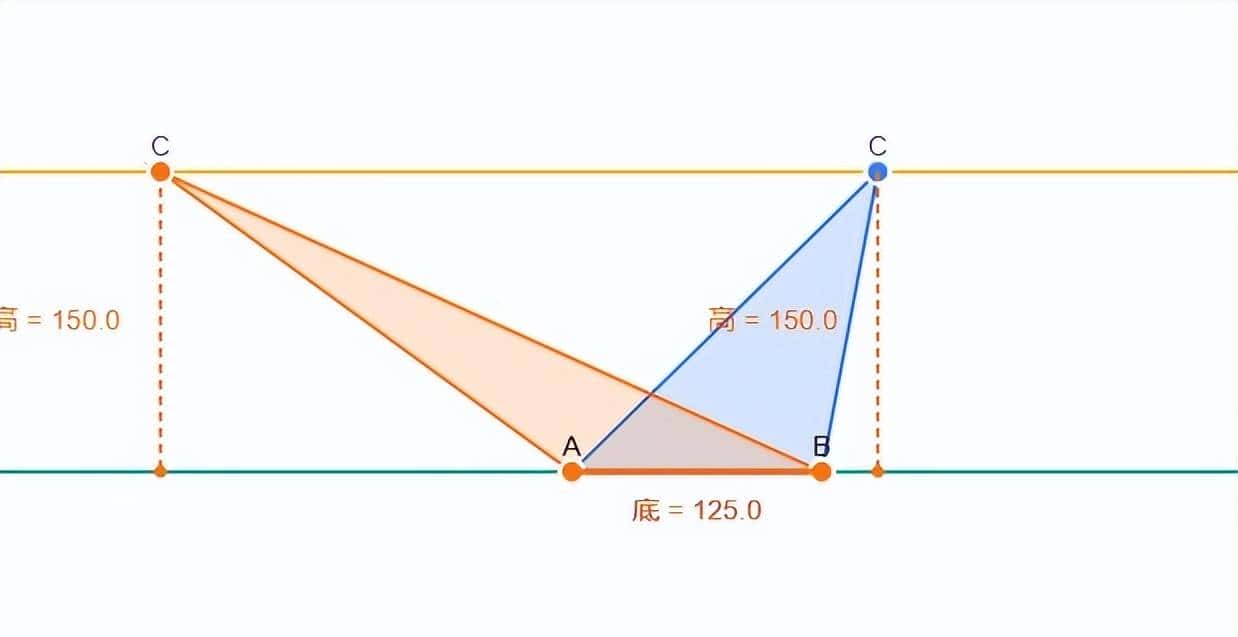
2.点击”随机生成“按钮,可以随机生成不同形状的三角形,计算其面积。
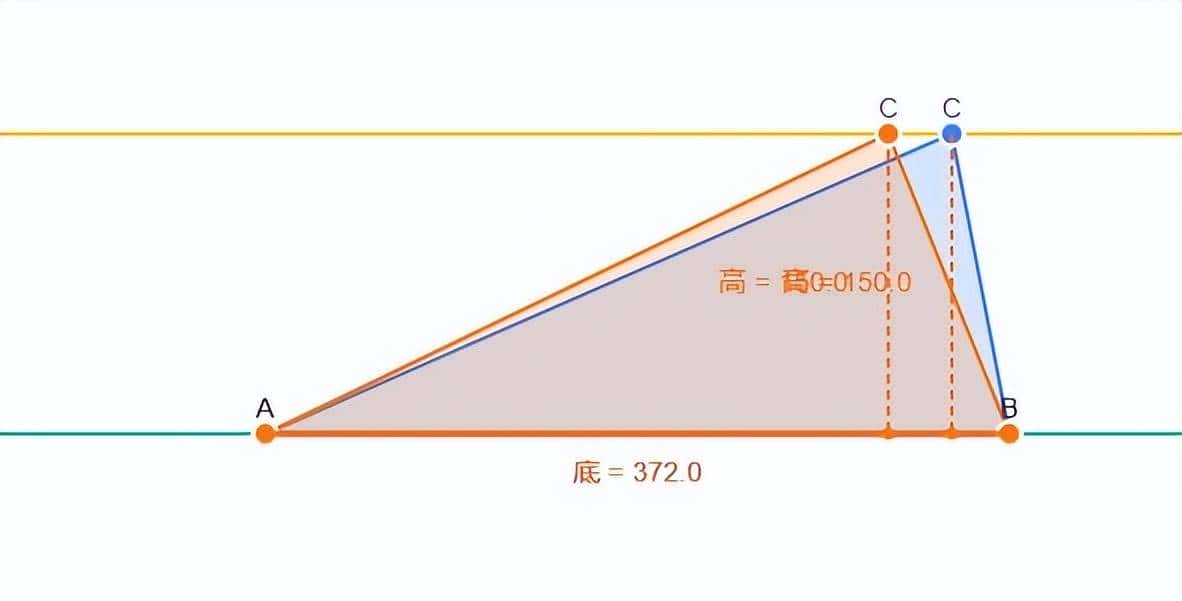
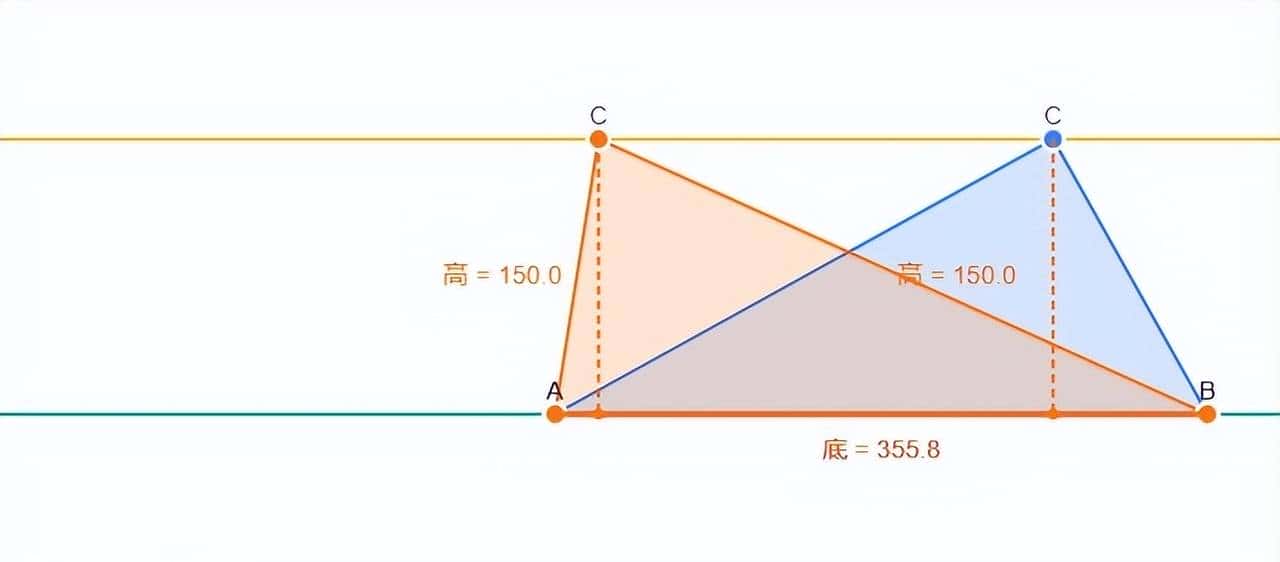
附完整的程序代码,老师们可以直接复制使用。
<!DOCTYPE html>
<html lang="zh-CN">
<head>
<meta charset="UTF-8">
<meta name="viewport" content="width=device-width, initial-scale=1.0">
<title>等底等高三角形面积相等 - 小学数学教学工具</title>
<!-- Tailwind CSS v3 -->
<script src="https://cdn.tailwindcss.com"></script>
<!-- Font Awesome -->
<link href="https://cdn.jsdelivr.net/npm/font-awesome@4.7.0/css/font-awesome.min.css" rel="stylesheet">
<script>
tailwind.config = {
theme: {
extend: {
colors: {
primary: '#3b82f6', // 蓝色 - 代表底边
secondary: '#f97316', // 橙色 - 代表高
accent: '#10b981', // 绿色 - 代表面积相等
neutral: '#f3f4f6', // 浅灰色 - 背景
},
fontFamily: {
sans: ['Inter', 'system-ui', 'sans-serif'],
},
animation: {
'bounce-slow': 'bounce 2s infinite',
}
}
}
}
</script>
<style type="text/tailwindcss">
@layer utilities {
.grid-bg {
background-size: 50px 50px; /* 每个单位50像素 */
background-image:
linear-gradient(to right, rgba(59, 130, 246, 0.3) 1px, transparent 1px),
linear-gradient(to bottom, rgba(59, 130, 246, 0.3) 1px, transparent 1px);
}
.vertex {
cursor: move;
transition: fill 0.2s, r 0.2s;
}
.vertex:hover {
r: 8;
}
.vertex.active {
fill: #ef4444;
r: 8;
}
.formula-highlight {
@apply bg-yellow-100 px-1 py-0.5 rounded font-bold;
}
.equal-sign {
@apply text-accent text-3xl font-bold mx-2 animate-bounce-slow;
}
}
</style>
</head>
<body class="bg-neutral min-h-screen font-sans text-gray-800">
<div class="container mx-auto px-4 py-8 max-w-6xl">
<!-- 标题区域 -->
<header class="text-center mb-8">
<h1 class="text-3xl md:text-4xl font-bold text-gray-800 mb-2">等底等高的三角形面积相等</h1>
<p class="text-gray-600">通过交互式演示,直观理解三角形面积公式和性质</p>
</header>
<!-- 主要内容区域 -->
<div class="flex flex-col lg:flex-row gap-6">
<!-- 左侧:Canvas绘图区域 -->
<div class="lg:w-2/3 bg-white rounded-xl shadow-lg p-4 relative">
<div class="absolute top-4 right-4 bg-primary/10 text-primary px-3 py-1 rounded-full text-sm font-medium">
<i class="fa fa-info-circle mr-1"></i> 拖动顶点调整三角形
</div>
<canvas id="triangleCanvas" class="w-full border border-gray-200 rounded-lg grid-bg" height="400"></canvas>
<!-- 操作按钮 -->
<div class="flex justify-center mt-4 gap-4">
<button id="resetBtn" class="bg-gray-200 hover:bg-gray-300 text-gray-700 px-4 py-2 rounded-lg transition-colors flex items-center">
<i class="fa fa-refresh mr-2"></i> 重置
</button>
<button id="randomBtn" class="bg-primary hover:bg-primary/90 text-white px-4 py-2 rounded-lg transition-colors flex items-center">
<i class="fa fa-random mr-2"></i> 随机生成
</button>
</div>
</div>
<!-- 右侧:面积计算与说明区域 -->
<div class="lg:w-1/3 bg-white rounded-xl shadow-lg p-6">
<h2 class="text-xl font-bold mb-4 text-gray-800 border-b pb-2">面积计算与说明</h2>
<!-- 公式展示 -->
<div class="mb-6">
<h3 class="text-lg font-semibold mb-2 text-gray-700">三角形面积公式</h3>
<div class="bg-gray-50 p-3 rounded-lg text-center">
<span class="text-xl">面积 = </span>
<span class="text-xl formula-highlight">底 × 高 ÷ 2</span>
</div>
</div>
<!-- 三角形1计算 -->
<div class="mb-4 p-3 bg-primary/5 rounded-lg">
<h3 class="font-medium text-primary mb-2">三角形 1</h3>
<div class="grid grid-cols-2 gap-2 text-sm">
<div>底 (b₁):</div>
<div id="base1" class="font-medium">4.0 单位</div>
<div>高 (h₁):</div>
<div id="height1" class="font-medium">3.0 单位</div>
<div>面积 (S₁):</div>
<div id="area1" class="font-bold text-primary">6.0 平方单位</div>
</div>
</div>
<!-- 三角形2计算 -->
<div class="mb-6 p-3 bg-secondary/5 rounded-lg">
<h3 class="font-medium text-secondary mb-2">三角形 2</h3>
<div class="grid grid-cols-2 gap-2 text-sm">
<div>底 (b₂):</div>
<div id="base2" class="font-medium">4.0 单位</div>
<div>高 (h₂):</div>
<div id="height2" class="font-medium">3.0 单位</div>
<div>面积 (S₂):</div>
<div id="area2" class="font-bold text-secondary">6.0 平方单位</div>
</div>
</div>
<!-- 面积相等验证 -->
<div class="mb-6 p-4 bg-accent/5 rounded-lg text-center">
<div class="flex items-center justify-center">
<span id="area1Display" class="font-bold text-primary">6.0</span>
<span class="equal-sign">=</span>
<span id="area2Display" class="font-bold text-secondary">6.0</span>
</div>
<p class="text-accent font-medium mt-2">等底等高的三角形面积相等</p>
</div>
<!-- 概念解释 -->
<div class="text-sm text-gray-600">
<h3 class="font-semibold text-gray-700 mb-2">概念说明</h3>
<p>当两个三角形拥有一样的底边长度,并且它们的高也相等时,无论三角形的形状如何变化,它们的面积始终相等。</p>
<p class="mt-2">这是由于三角形的面积只与它的底和高有关,与形状无关。</p>
</div>
</div>
</div>
<!-- 底部说明 -->
<footer class="mt-8 text-center text-gray-500 text-sm">
<p>小学数学教学可视化工具 | 协助学生直观理解几何概念</p>
</footer>
</div>
<script>
// 获取Canvas元素和上下文
const canvas = document.getElementById('triangleCanvas');
const ctx = canvas.getContext('2d');
// 设置Canvas尺寸
function resizeCanvas() {
const container = canvas.parentElement;
canvas.width = container.clientWidth;
// 保持高度为400px
}
// 初始化时调整Canvas尺寸
resizeCanvas();
window.addEventListener('resize', resizeCanvas);
// 三角形顶点数据
let triangles = [
{
color: '#3b82f6', // 蓝色
vertices: [
{ x: 100, y: 300, active: false }, // 底边左顶点
{ x: 300, y: 300, active: false }, // 底边右顶点
{ x: 200, y: 150, active: false } // 顶点
],
base: 200,
height: 150,
area: 15000
},
{
color: '#f97316', // 橙色
vertices: [
{ x: 100, y: 300, active: false }, // 底边左顶点 (与第一个三角形共享)
{ x: 300, y: 300, active: false }, // 底边右顶点 (与第一个三角形共享)
{ x: 250, y: 150, active: false } // 顶点
],
base: 200,
height: 150,
area: 15000
}
];
// 当前选中的顶点
let selectedVertex = null;
let selectedTriangleIndex = -1;
// 绘制三角形
function drawTriangles() {
// 清空画布
ctx.clearRect(0, 0, canvas.width, canvas.height);
// 绘制网格边界
const gridWidth = 16; // 16个单位宽
const gridHeight = 8; // 8个单位高
const unitSize = 50; // 每个单位50像素
// 绘制网格边界
ctx.beginPath();
ctx.rect(0, 0, gridWidth * unitSize, gridHeight * unitSize);
ctx.strokeStyle = '#3b82f6';
ctx.lineWidth = 2;
ctx.stroke();
// 绘制绿色水平线(底边AB的限制线)
const baseY = 300; // 底边Y坐标
ctx.beginPath();
ctx.moveTo(0, baseY);
ctx.lineTo(gridWidth * unitSize, baseY);
ctx.strokeStyle = '#10b981'; // 绿色
ctx.lineWidth = 2;
ctx.stroke();
// 绘制黄色水平线(顶点C的限制线)
const vertexY = 150; // 顶点Y坐标
ctx.beginPath();
ctx.moveTo(0, vertexY);
ctx.lineTo(gridWidth * unitSize, vertexY);
ctx.strokeStyle = '#fbbf24'; // 黄色
ctx.lineWidth = 2;
ctx.stroke();
// 绘制两个三角形
triangles.forEach((triangle, triangleIndex) => {
ctx.beginPath();
ctx.moveTo(triangle.vertices[0].x, triangle.vertices[0].y);
ctx.lineTo(triangle.vertices[1].x, triangle.vertices[1].y);
ctx.lineTo(triangle.vertices[2].x, triangle.vertices[2].y);
ctx.closePath();
// 填充半透明颜色
ctx.fillStyle = triangle.color + '33'; // 添加透明度
ctx.fill();
// 绘制边框
ctx.strokeStyle = triangle.color;
ctx.lineWidth = 2;
ctx.stroke();
// 绘制顶点
triangle.vertices.forEach((vertex, vertexIndex) => {
ctx.beginPath();
ctx.arc(vertex.x, vertex.y, vertex.active ? 8 : 6, 0, Math.PI * 2);
ctx.fillStyle = vertex.active ? '#ef4444' : triangle.color;
ctx.fill();
ctx.strokeStyle = '#ffffff';
ctx.lineWidth = 2;
ctx.stroke();
// 标记顶点A、B、C
ctx.fillStyle = '#333333';
ctx.font = '14px Arial';
ctx.textAlign = 'center';
ctx.textBaseline = 'middle';
const labelOffset = vertex.active ? 15 : 12;
ctx.fillText(
String.fromCharCode(65 + vertexIndex),
vertex.x,
vertex.y - labelOffset
);
});
// 绘制底边和高
drawBaseAndHeight(triangle);
});
}
// 绘制底边和高
function drawBaseAndHeight(triangle) {
const p1 = triangle.vertices[0]; // 底边左顶点
const p2 = triangle.vertices[1]; // 底边右顶点
const p3 = triangle.vertices[2]; // 顶点
// 绘制底边
ctx.beginPath();
ctx.moveTo(p1.x, p1.y);
ctx.lineTo(p2.x, p2.y);
ctx.strokeStyle = triangle.color;
ctx.lineWidth = 3;
ctx.stroke();
// 计算高的垂足
const baseVector = { x: p2.x - p1.x, y: p2.y - p1.y };
const baseLength = Math.sqrt(baseVector.x * baseVector.x + baseVector.y * baseVector.y);
const baseUnitVector = { x: baseVector.x / baseLength, y: baseVector.y / baseLength };
const vertexVector = { x: p3.x - p1.x, y: p3.y - p1.y };
const projectionLength = vertexVector.x * baseUnitVector.x + vertexVector.y * baseUnitVector.y;
const footPoint = {
x: p1.x + projectionLength * baseUnitVector.x,
y: p1.y + projectionLength * baseUnitVector.y
};
// 绘制高
ctx.beginPath();
ctx.moveTo(p3.x, p3.y);
ctx.lineTo(footPoint.x, footPoint.y);
ctx.strokeStyle = '#f97316'; // 橙色
ctx.lineWidth = 2;
ctx.setLineDash([5, 3]);
ctx.stroke();
ctx.setLineDash([]);
// 绘制高的垂足标记
ctx.beginPath();
ctx.arc(footPoint.x, footPoint.y, 3, 0, Math.PI * 2);
ctx.fillStyle = '#f97316';
ctx.fill();
// 标记底边长度
const baseMidpoint = {
x: (p1.x + p2.x) / 2,
y: (p1.y + p2.y) / 2 + 20
};
ctx.fillStyle = triangle.color;
ctx.font = '14px Arial';
ctx.textAlign = 'center';
ctx.fillText(`底 = ${baseLength.toFixed(1)}`, baseMidpoint.x, baseMidpoint.y);
// 标记高的长度
const heightMidpoint = {
x: (p3.x + footPoint.x) / 2 - 20,
y: (p3.y + footPoint.y) / 2
};
ctx.fillStyle = '#f97316';
ctx.textAlign = 'right';
ctx.fillText(`高 = ${calculateDistance(p3, footPoint).toFixed(1)}`, heightMidpoint.x, heightMidpoint.y);
}
// 计算两点之间的距离
function calculateDistance(p1, p2) {
const dx = p2.x - p1.x;
const dy = p2.y - p1.y;
return Math.sqrt(dx * dx + dy * dy);
}
// 计算三角形面积
function calculateTriangleArea(triangle) {
const p1 = triangle.vertices[0];
const p2 = triangle.vertices[1];
const p3 = triangle.vertices[2];
// 使用底和高计算面积
const base = calculateDistance(p1, p2);
// 计算高(顶点到对边的垂直距离)
const area = Math.abs((p2.x - p1.x) * (p3.y - p1.y) - (p2.y - p1.y) * (p3.x - p1.x)) / 2;
const height = (2 * area) / base;
triangle.base = base;
triangle.height = height;
triangle.area = area;
return area;
}
// 更新面积显示
function updateAreaDisplay() {
// 计算两个三角形的面积
const area1 = calculateTriangleArea(triangles[0]);
const area2 = calculateTriangleArea(triangles[1]);
// 更新显示
document.getElementById('base1').textContent = `${triangles[0].base.toFixed(1)} 单位`;
document.getElementById('height1').textContent = `${triangles[0].height.toFixed(1)} 单位`;
document.getElementById('area1').textContent = `${area1.toFixed(1)} 平方单位`;
document.getElementById('base2').textContent = `${triangles[1].base.toFixed(1)} 单位`;
document.getElementById('height2').textContent = `${triangles[1].height.toFixed(1)} 单位`;
document.getElementById('area2').textContent = `${area2.toFixed(1)} 平方单位`;
// 更新面积相等验证
document.getElementById('area1Display').textContent = area1.toFixed(1);
document.getElementById('area2Display').textContent = area2.toFixed(1);
}
// 检查鼠标是否在顶点附近
function getVertexAtPosition(x, y) {
for (let i = 0; i < triangles.length; i++) {
for (let j = 0; j < triangles[i].vertices.length; j++) {
const vertex = triangles[i].vertices[j];
const distance = calculateDistance({ x, y }, vertex);
if (distance < 15) { // 15像素范围内视为选中
return { triangleIndex: i, vertexIndex: j };
}
}
}
return null;
}
// 鼠标按下事件处理
canvas.addEventListener('mousedown', (e) => {
const rect = canvas.getBoundingClientRect();
const x = e.clientX - rect.left;
const y = e.clientY - rect.top;
// 检查是否点击了顶点
const vertexInfo = getVertexAtPosition(x, y);
if (vertexInfo) {
selectedTriangleIndex = vertexInfo.triangleIndex;
selectedVertex = vertexInfo.vertexIndex;
// 标记顶点为活动状态
triangles[selectedTriangleIndex].vertices[selectedVertex].active = true;
// 重绘
drawTriangles();
}
});
// 鼠标移动事件处理
canvas.addEventListener('mousemove', (e) => {
if (selectedVertex !== null && selectedTriangleIndex !== -1) {
const rect = canvas.getBoundingClientRect();
let x = e.clientX - rect.left;
let y = e.clientY - rect.top;
// 网格参数
const gridWidth = 16; // 16个单位宽
const gridHeight = 8; // 8个单位高
const unitSize = 50; // 每个单位50像素
const gridMaxX = gridWidth * unitSize;
const gridMaxY = gridHeight * unitSize;
// 限制在网格范围内
x = Math.max(0, Math.min(x, gridMaxX));
y = Math.max(0, Math.min(y, gridMaxY));
// 根据顶点类型限制移动
if (selectedVertex === 0 || selectedVertex === 1) {
// A点和B点只能在绿色水平线上移动
y = 300; // 绿色线的Y坐标
} else if (selectedVertex === 2) {
// C点只能在黄色水平线上移动
y = 150; // 黄色线的Y坐标
}
// 更新选中顶点的位置
triangles[selectedTriangleIndex].vertices[selectedVertex].x = x;
triangles[selectedTriangleIndex].vertices[selectedVertex].y = y;
// 确保两个三角形共享一样的底边
if (selectedTriangleIndex === 0) {
if (selectedVertex === 0 || selectedVertex === 1) {
triangles[1].vertices[selectedVertex].x = x;
triangles[1].vertices[selectedVertex].y = y;
}
} else {
if (selectedVertex === 0 || selectedVertex === 1) {
triangles[0].vertices[selectedVertex].x = x;
triangles[0].vertices[selectedVertex].y = y;
}
}
// 重绘和更新面积
drawTriangles();
updateAreaDisplay();
}
});
// 鼠标释放事件处理
canvas.addEventListener('mouseup', () => {
if (selectedVertex !== null && selectedTriangleIndex !== -1) {
// 撤销顶点的活动状态
triangles[selectedTriangleIndex].vertices[selectedVertex].active = false;
// 清除选中状态
selectedVertex = null;
selectedTriangleIndex = -1;
// 重绘
drawTriangles();
}
});
// 鼠标离开Canvas事件处理
canvas.addEventListener('mouseleave', () => {
if (selectedVertex !== null && selectedTriangleIndex !== -1) {
// 撤销顶点的活动状态
triangles[selectedTriangleIndex].vertices[selectedVertex].active = false;
// 清除选中状态
selectedVertex = null;
selectedTriangleIndex = -1;
// 重绘
drawTriangles();
}
});
// 重置按钮点击事件
document.getElementById('resetBtn').addEventListener('click', () => {
// 网格参数
const unitSize = 50; // 每个单位50像素
// 重置三角形顶点位置
triangles = [
{
color: '#3b82f6', // 蓝色
vertices: [
{ x: 2 * unitSize, y: 6 * unitSize, active: false }, // 底边左顶点 (2,6)
{ x: 6 * unitSize, y: 6 * unitSize, active: false }, // 底边右顶点 (6,6)
{ x: 4 * unitSize, y: 3 * unitSize, active: false } // 顶点 (4,3)
],
base: 4 * unitSize,
height: 3 * unitSize,
area: (4 * unitSize * 3 * unitSize) / 2
},
{
color: '#f97316', // 橙色
vertices: [
{ x: 2 * unitSize, y: 6 * unitSize, active: false }, // 底边左顶点 (与第一个三角形共享)
{ x: 6 * unitSize, y: 6 * unitSize, active: false }, // 底边右顶点 (与第一个三角形共享)
{ x: 5 * unitSize, y: 3 * unitSize, active: false } // 顶点 (5,3)
],
base: 4 * unitSize,
height: 3 * unitSize,
area: (4 * unitSize * 3 * unitSize) / 2
}
];
// 重绘和更新面积
drawTriangles();
updateAreaDisplay();
});
// 随机生成按钮点击事件
document.getElementById('randomBtn').addEventListener('click', () => {
// 网格参数
const gridWidth = 16; // 16个单位宽
const gridHeight = 8; // 8个单位高
const unitSize = 50; // 每个单位50像素
// 固定的Y坐标(符合限制线)
const baseY = 6 * unitSize; // 绿色线的Y坐标(第6个单位)
const vertexY = 3 * unitSize; // 黄色线的Y坐标(第3个单位)
// 随机生成底边位置(在网格范围内)
const minBaseLength = 2 * unitSize; // 最小底边长度:2个单位
const maxBaseLength = 8 * unitSize; // 最大底边长度:8个单位
const baseLength = minBaseLength + Math.random() * (maxBaseLength - minBaseLength);
// 确保底边在网格范围内
const maxBaseX1 = gridWidth * unitSize - baseLength;
const baseX1 = unitSize + Math.random() * (maxBaseX1 - unitSize); // 至少1个单位的边距
const baseX2 = baseX1 + baseLength;
// 随机生成两个三角形的顶点(只能在黄色水平线上左右移动)
const vertexX1 = baseX1 + Math.random() * baseLength;
const vertexX2 = baseX1 + Math.random() * baseLength;
// 计算高度
const height = baseY - vertexY;
// 更新三角形顶点
triangles = [
{
color: '#3b82f6', // 蓝色
vertices: [
{ x: baseX1, y: baseY, active: false }, // 底边左顶点
{ x: baseX2, y: baseY, active: false }, // 底边右顶点
{ x: vertexX1, y: vertexY, active: false } // 顶点
],
base: baseLength,
height: height,
area: baseLength * height / 2
},
{
color: '#f97316', // 橙色
vertices: [
{ x: baseX1, y: baseY, active: false }, // 底边左顶点 (与第一个三角形共享)
{ x: baseX2, y: baseY, active: false }, // 底边右顶点 (与第一个三角形共享)
{ x: vertexX2, y: vertexY, active: false } // 顶点
],
base: baseLength,
height: height,
area: baseLength * height / 2
}
];
// 重绘和更新面积
drawTriangles();
updateAreaDisplay();
});
// 初始化绘制
drawTriangles();
updateAreaDisplay();
</script>
</body>
</html>
© 版权声明
文章版权归作者所有,未经允许请勿转载。如内容涉嫌侵权,请在本页底部进入<联系我们>进行举报投诉!
THE END











暂无评论内容